For holders
Reading a coin page
What every part of a coin's page means, and the signs worth checking first.
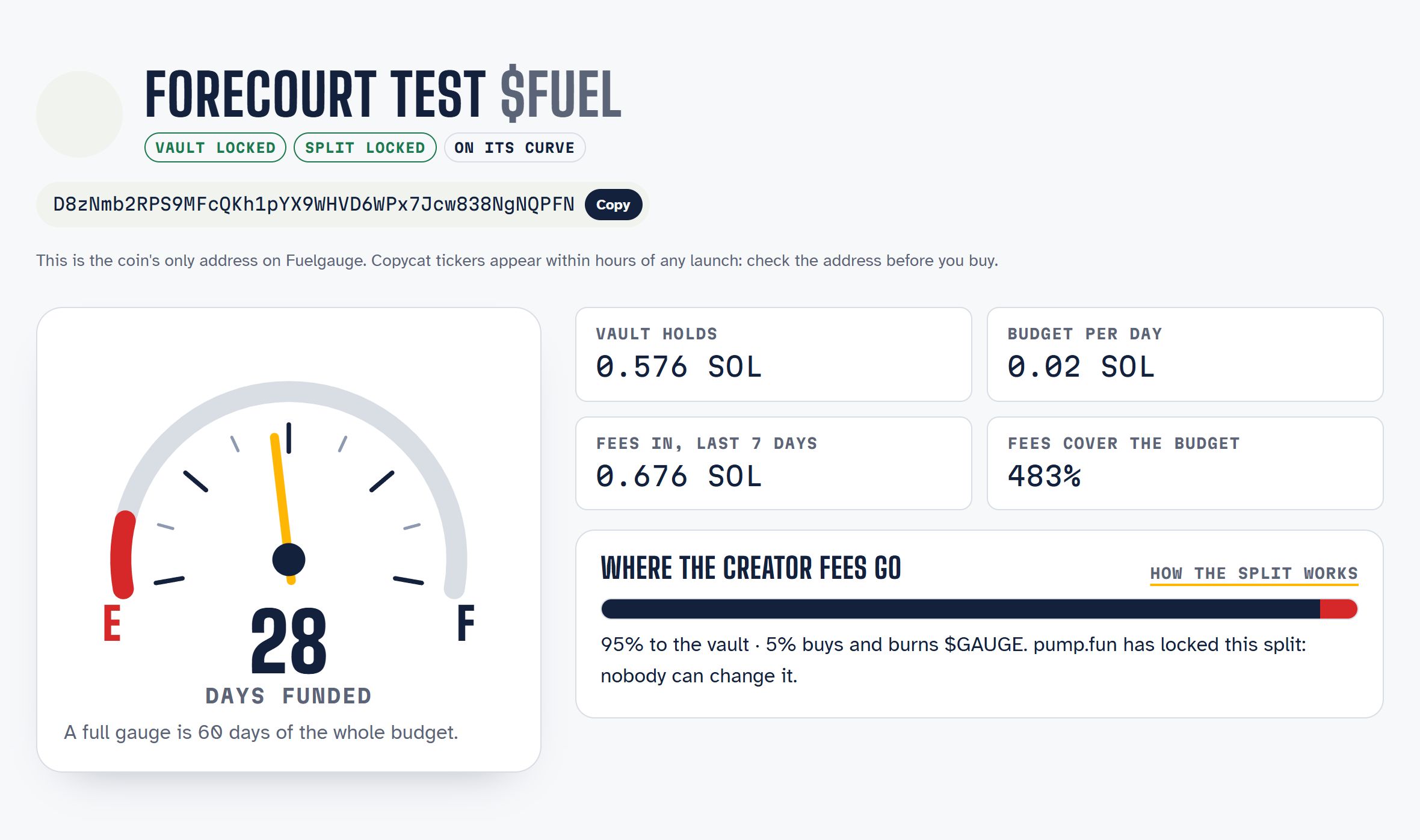
#The badges
| Badge | Meaning |
|---|---|
| Vault locked | Nobody can execute anything on the vault; only its budget lines can move SOL |
| Editable vault | The creator can change the vault, after a public time lock |
| Change pending | The creator has proposed a change to an editable vault; it can run after the time lock |
| Split locked | pump.fun has revoked the right to change where the creator fees go |
| Checks failing | Something on chain no longer matches the listing; the keeper has stopped paying this coin's lines |
| Sunset: burning | No line was paid for the idle period; the vault's SOL is buying the coin back and burning it |
#The address
The coin's mint address is shown in full with a copy button. Copycat tickers appear within hours of any launch, so compare this address with the one you are buying.
#The gauge and its four numbers
- Days funded: how long the vault's balance pays the whole budget. A full gauge is 60 days.
- Vault holds: SOL in the vault now.
- Budget per day: every line's amount, spread per day.
- Fees in, last 7 days: what the coin's trading sent to the vault this week.
- Fees cover the budget: last week's fees against the daily budget. Above 100% the vault is filling; below 100% it is running down.
See The gauge, exactly for the formulas.
#Where the creator fees go
A bar shows the split. On a listed coin it is always the vault (95%) and the burn (5%), and it says whether pump.fun has locked it.
#The budget
Each row is a line:
- what it pays for;
- its payee (linked to Solscan);
- its cap per period;
- who pays it (the keeper automatically, or the creator with a note);
- what it has left this period;
- what it has paid in total.
Lines with a proof URL show the address they depend on.
#Receipts
Every SOL movement in or out of the vault, newest first:
- fees in from pump.fun;
- paid to a named line, with the creator's note;
- sunset moves to the coin's sunset wallet.
Each links to its transaction.
#Sunset
Shows the idle period, when the sunset would start if no line is paid, the coin's sunset wallet, and how much of the coin has been burned so far.
#The vault and its checks
The vault card shows whether it is locked or editable, and its members and their roles. The checks list everything Fuelgauge verified on chain on its last pass, every few minutes. A failing required check flags the coin.